Abstract digital background with glowing blue network nodes, circuit-like lines, and dark geometric shapes on a black field.

 Build a Clear Understanding of AI Automation 

A futuristic dark blue and black digital rendering with glowing cyan circuit lines, geometric panels, and floating white spheres, resembling a high-tech interior or abstract technology concept scene.

 Explore structured courses

Shop all

 Automation, Explained With Purpose 

Our mission is to help learners develop a structured understanding of AI automation through clear explanations, practical examples, and carefully organized study materials. We focus on workflow planning, process logic, information flow, documentation, and thoughtful review so learners can explore automation concepts step by step.

  • Julia Voss — Intelligent Workflow Planner

     Julia Voss 

    Intelligent Workflow Planner
    Julia plans AI-supported workflows by defining inputs, process stages, decision points, and review checkpoints. She studies how repeated tasks can be arranged into structured sequences with clearly documented responsibilities. Her work emphasizes practical planning and understandable workflow design

  • Kellan Roake — Automation Logic Analyst

     Kellan Roake 

    Automation Logic Analyst
    Kellan studies decision paths, conditions, and dependencies within AI automation systems. He reviews how information moves through workflows and identifies areas where logic can be organized more clearly. His work focuses on structured rules, branching paths, and process consistency.

  • Talia Renwick — Automation Process Review Specialist

    Talia Renwick 

    Automation Process Specialist
    Talia reviews AI automation structures to examine dependencies, repeated steps, and information handoffs. She compares workflow versions and documents changes that affect connected process stages. Her work focuses on organized review methods and clear communication of workflow structure.

 Built Around Clear Learning 

Qorvaniqer began from a need for clearer AI automation education. Our team saw that many learners encountered disconnected explanations, complicated terminology, and workflow examples without enough structure. We created Qorvaniqer to organize these ideas into practical learning materials that explain how inputs, decisions, actions, review points, and outputs connect within complete automation processes.

 30-days refund guarantee 

Try the course with no risk. If it isn’t a fit, request a full refund within 30 days of purchase. No questions, no extra steps — just our Refund Policy.

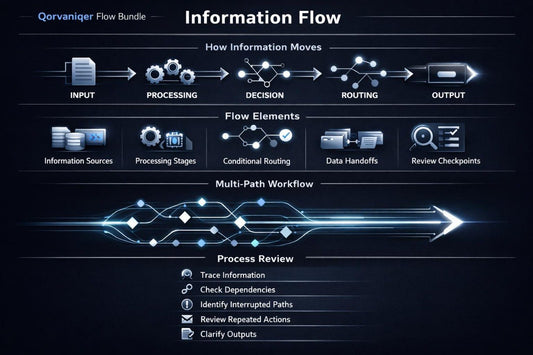
  • A person holding a white tablet from behind, showing a digital screen with a dark futuristic interface and the text '5.0 DIY BUNDLE'.
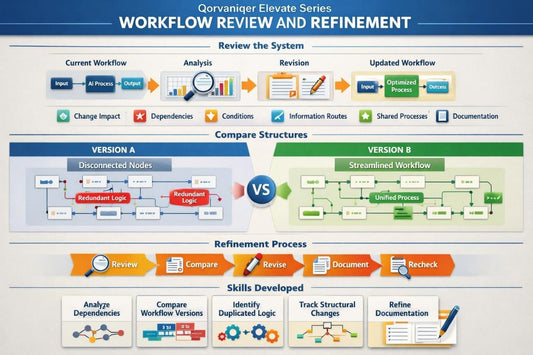
  • A dark gray laptop shown open at an angle on a plain white background, with its screen displaying a course graphic that reads 'ELEVATE SERIES COURSE'.
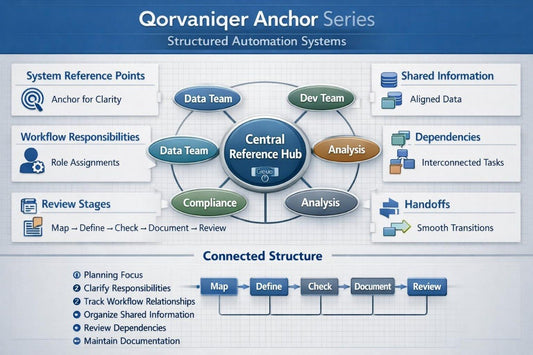
  • A black smartphone centered on a plain white background, displaying a dark tech-style screen graphic with the text 'ANCHOR SERIES' and 'V1.0'.

 Begin With a Free Guide 

Start with a free Qorvaniqer guide that introduces core AI automation concepts in a clear and structured format. The material covers basic workflow elements, simple process planning, and the relationship between inputs, actions, review points, and outputs. It is designed for independent study and provides a practical introduction to the learning approach used throughout the course collection. The free guide can be used as a starting point before exploring the wider Qorvaniqer course path.

  • A stylized white and light blue isometric illustration of a server rack or database stack on a plain white background.

     Clear Structure 

    Each Qojrvaniqer course organizes AI automation concepts into logical sections that make detailed workflow topics easier to follow and review.

  • A minimalist white line icon depicting a central square surrounded by a circle of connected nodes, with several small bright cyan dots and larger white-and-gray segmented user-profile silhouettes arranged around the perimeter on a solid black background.

     Practical Examples 

    Realistic workflow scenarios help learners connect theoretical concepts with structured approaches to everyday digital processes and repeated tasks.

  • A digital graphic icon depicting a stylized human brain with circuitry and neural pathways, rendered in cyan and white on a solid black background.

     Progressive Learning 

    The course collection develops from introductory workflow concepts toward more detailed automation structures, dependencies, documentation, and system planning.

  • A digital graphic illustration of a circular network or smartwatch ecosystem, featuring multiple dark blue and black smartwatch faces connected by white lines and a cyan central hand on a solid white background.

     Independent Study 

    Qorvaniqer downloadable materials allow learners to study at their own pace, revisit previous modules, and review important concepts whenever needed.

  • Eliza Monroe

     Eliza Monroe 

    Eliza was already familiar with repeated digital tasks but had not spent much time studying workflow documentation or dependency mapping. She wanted a clearer way to understand how information moves between different stages of an automation process.

    The organized format and practical workflow examples were useful because they gave her a consistent way to review inputs, decisions, handoffs, and outputs.

    “I liked that the course focused on structure and gave me a clear way to examine each stage of a workflow.”

  • Nick Mercer

     Nick Mercer 

    Nick came with experience planning simple processes but found larger workflow structures harder to review. He wanted to better understand branching logic, connected processes, and the role of documentation in more detailed automation systems.

    The visual process maps and carefully separated modules were useful because they made complex workflow relationships easier to study one section at a time.

    “The examples gave me a better framework for reviewing dependencies and decision paths.”

 See How the Learning Path Is Built 

Qorvaniqer courses explore AI automation through structured materials that move from foundational concepts toward more detailed workflow planning and system organization. Each course focuses on a defined area such as process mapping, decision logic, information flow, dependencies, documentation, and connected workflows. The collection is arranged to help learners compare topics and choose the material that matches their current study goals. Use the Preview Courses button to review the course collection and see how the learning path is organized.

  • GitHub logo with a black circle and white cat-like face design
  • Black circle with a white letter 'M' in the center
  • LinkedIn logo on a white background